

Key Takeaways
Table of Contents
Introduction
You have implemented this model in your cloud environment. The model takes purchase order emails and automatically creates an entry for your employees to complete. However, on Monday morning, you get a large batch of orders (dozens of orders at once) and the model endpoint begins to fail. Since the product catalog has not been updated, and you cannot tell which orders need to be manually re-entered, things begin to go wrong.
AI Ready Cloud Infrastructure will prevent this scenario from happening. You want to ensure that you can run a model in your cloud infrastructure to meet real demands, using up-to-date data, and allow the workflow to cope if a dependency fails.
Quick Answer
Ensure that your infrastructure can support AI in production with enough capacity, good data, secure communications and control. Understand the timescales of tasks. Consider the impact of not meeting these timescales. Put realistic load on model limits, data freshness and recovery processes. Decide appropriate capacity (and whether to increase user base) based on results.
What Does Your AI Workload Actually Need?
In some cases processing can be delayed. For example, generating reports on a weekly basis can be put in a queue. However, for a user to complete check out, delays would be problematic. Training / tuning models may also have varying requirements. Capacity may be required during specific times of the day.
| Workload | What to plan for | What to test |
|---|---|---|
| Interactive assistant | Response time, concurrent requests, and model quotas | Whether replies stay usable during a burst of simultaneous requests |
| Batch document processing | Queue capacity, completion deadlines, and safe retries | Whether interrupted jobs resume without processing the same document twice |
| Self-hosted inference | Model memory needs, accelerator availability, and maintenance | Whether the service can replace a failed instance without missing its target |
When comparing cloud hosting, distinguish the capacity of your application from the capacity of the model it calls. Adding application servers can help a busy frontend, but it won’t raise a managed model endpoint’s quota. Check limits for the intended model, deployment, and region before committing to a launch date.

Is Your Data Ready to Support the Workflow?
Ensure reliability of data. Where there may be gaps or out of date data, ensure updates happen on a regular basis. If the product code on the purchase order and the product code in the catalogue do not match, then this order should be flagged. Do not automatically change the product.
Ask the data engineering team to make freshness visible. The time of the last update to the catalogue should be visible to users. Decide at what point (based on how out of date the feed is) the automation should pause. Decide who can restart the automation in this scenario. Try testing with old items, mismatched units and late updates.
Limit what records can be processed by this service. A preparation service should not have permission to complete orders. Separating the preparation and completion means that if automation is paused, staff will still be able to easily continue work.

Do You Need a Managed AI Service or Your Own GPUs?
Consider using a managed service. Ensure that you know which models are available in which regions, the conditions of use and the limits of scaling. Even with a managed service, you may experience limitations to how much you can scale. Scaling across different deployments could have different performance characteristics.
If specific models are required, or greater control is required over the running of these models, or if it is anticipated that a model will be used for a long period of time (potentially requiring dedicated capacity), consider self hosting. Consider fully the total cost of ownership, including availability of accelerators, upgrading capabilities, scaling and resilience, and what incident management support is required. Compare performance of this approach to that of a managed service for similar workloads. Even when deployed on in-house hardware, it may not be possible to meet SLAs for peak volumes.
What Should a Production Readiness Test Prove?
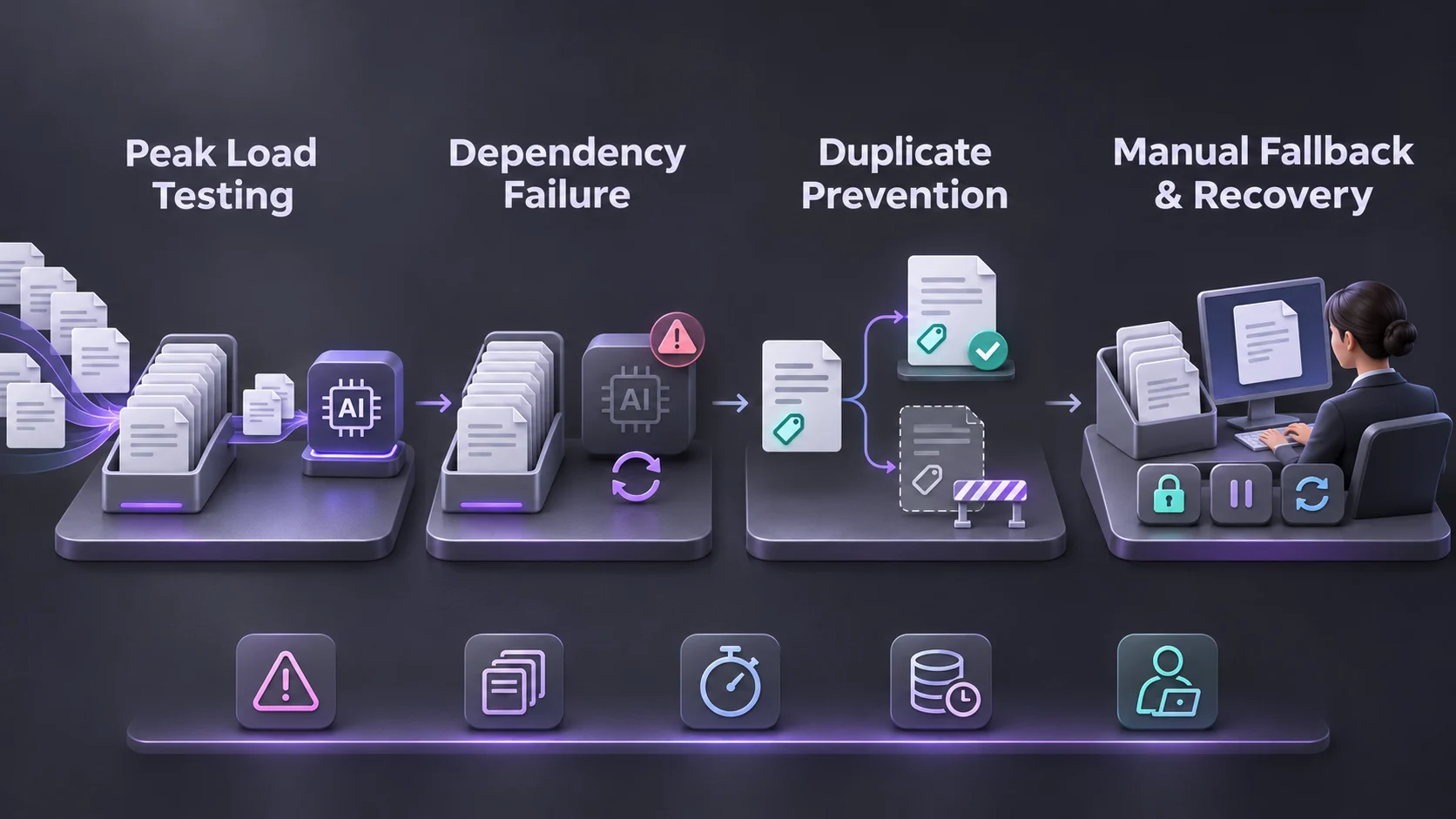
A realistic flow of incoming orders from distributors. Some large and small orders should be used. A few orders should be sent back for clarification. Consider how long the oldest order has been waiting, how many orders are passing through checks and how many require manual processing. An overall average may hide a build up in the queue meaning that it is only cleared just in time for order fulfillment.
Disruption
Introduce errors. Cause a rate limiting error, cause delays in refreshing the catalogue, and abort a job once the draft has been created. The next time the job is run it should detect the existing draft and not create a new one. Ensure that all orders have a consistent, unique identifier so that users can see which orders were received, drafted, or put on hold.
If the workflow uses agents, agent monitoring can help identify whether delays come from the model, a connected tool, or repeated attempts. Set a limit on retries, send unresolved work to a staffed queue, and name the person authorized to pause automation. A fallback is only useful if someone has tested it and knows when to use it.
Final Thoughts
Ensure that the AI workflow can cope under load, detect out-of-date data and can be recovered without duplication or data loss. Define acceptable performance times and error rates for the workflow, and decide if you need to scale, simplify or add manual validation based on this.
Once you have results from running a single workload, create a checklist to move forward. This will give you more insight into your cloud readiness than just knowing what infrastructure features you have.
For more on cloud infrastructure and enterprise AI, follow technology updates on LinkedIn.
Frequently Asked Questions
Is it production ready?
The system can process AI workloads within defined performance constraints and SLAs. It provides reliable data, controlled access, monitoring and a validated failover process.
Do I need GPUs for any AI workloads?
Not necessarily. The managed model service abstracts away the hardware. Some small models can be run on CPUs in self hosted deployments if performance constraints are met.
What is the difference between capacity and quota?
Capacity relates to the resources available on the cloud to host your application. Quota is how much traffic can be processed by a model deployment (in requests or tokens) at any one time.
Can I run AI within my own cloud?
Often you can. Ensure that you have capacity to run the model end point, sufficient connections to data, capacity for peak volumes of traffic and monitoring in place.
What should be monitored post deployment?
Monitor latency, backlog, model error rates, data freshness and intervention frequency. Create alerts for issues that may cause a delay in meeting the workflow SLA.
When is an AI pilot ready for production?
When it meets defined targets under realistic traffic patterns. It must also be able to recover from failure, without duplication, data loss or unassigned exceptions.