
Key Takeaways
- Hybrid AI architecture combines cloud-based and locally hosted AI processing, allowing businesses to distribute workloads according to their performance, security, and cost requirements.
- Cloud AI is suitable for fluctuating workloads, access to powerful AI models, scalable computing resources, and faster deployment with lower initial hardware investment.
- Local AI is preferable when businesses need greater direct control over sensitive data, low latency processing, or reliable operation in locations with limited internet connectivity.
- Neither cloud nor local AI is automatically faster, cheaper, or more secure. The right choice depends on workload requirements, infrastructure, connectivity, and maintenance responsibilities.
- A manufacturing business can use local AI to detect equipment abnormalities in real time while transferring approved data to the cloud for long-term analytics and reporting.
- Designing a hybrid architecture starts with classifying workloads, defining data movement rules, selecting suitable models, securing connections, and testing performance and failure scenarios.
- Hybrid AI requires strong security practices, including authentication, encryption, access permissions, logging, and regular security assessments.
- Hybrid deployment is not always more cost-effective. Businesses must compare cloud usage, local hardware, power, cooling, networking, data transfer, storage, security, and support expenses.
- MatchBest Software offers cloud infrastructure, data engineering, application development, and enterprise technology services that can support hybrid AI planning.
- The best deployment approach balances performance, data control, security, cost efficiency, and operational simplicity without introducing unnecessary infrastructure complexity.
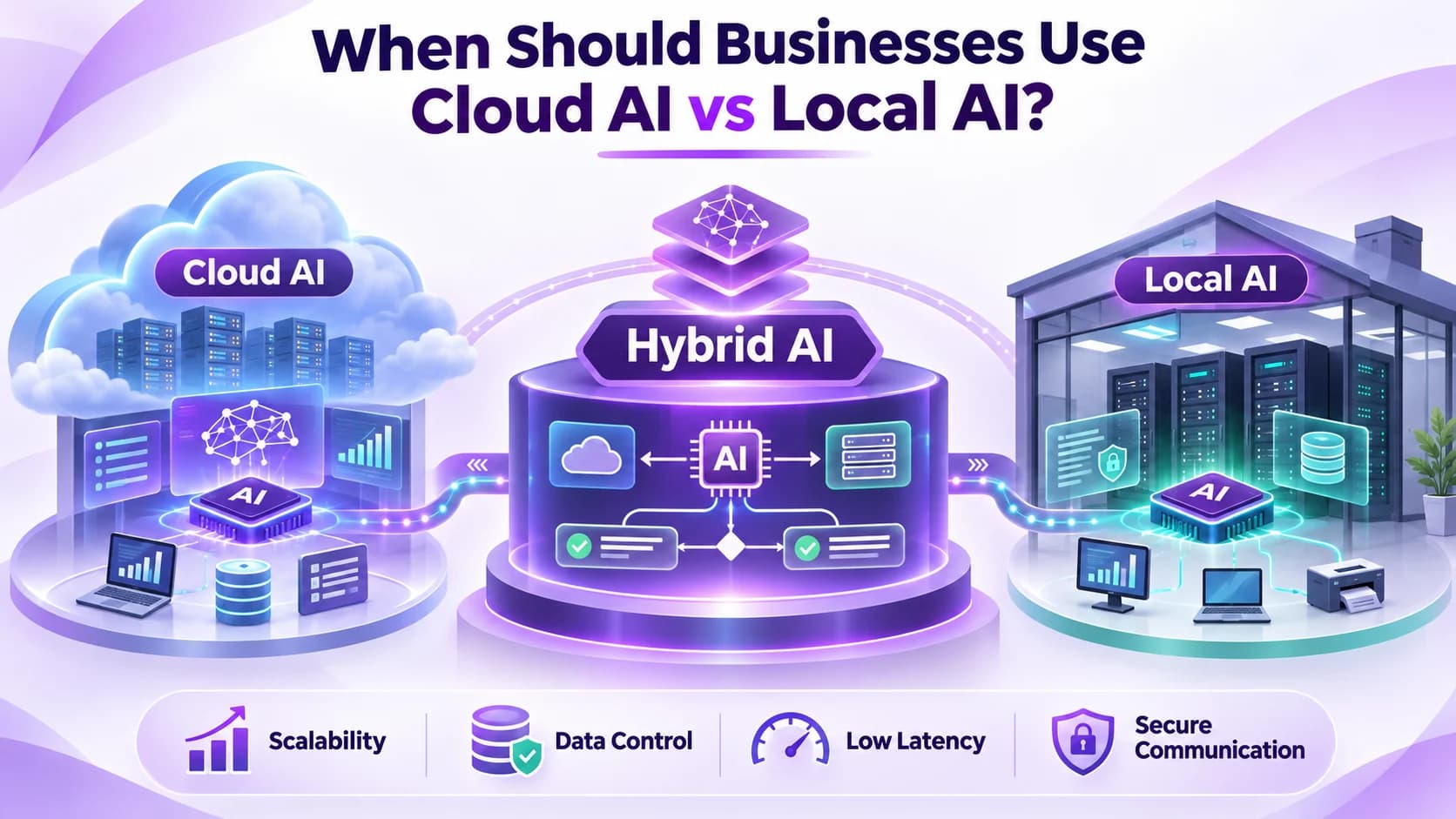
When Should Businesses Use Cloud AI vs Local AI?
There may be situations where a business would wish to use a Cloud AI but do not want to risk storing their sensitive financial data on the Cloud. Or a manufacturing plant may have a poor internet connection but require quick access to the decisions being made by an AI.
This is just a few examples of why a Cloud or On Premise AI can be difficult to implement.
Businesses are increasingly requiring a solution which gives a good balance between computation, data control, costs and scalability in 2026.
A Hybrid AI architecture can help solve this issue by distributing the computation across the business according to their needs.
Quick Answer
A hybrid AI architecture will provide an optimal solution for distributing your workloads. Cloud AI is ideal for dealing with fluctuating workloads, managed services and large models. On premises AI is ideal for handling sensitive data, latency and unreliable connections. All should be taken into consideration when choosing what type of deployment to use, for security, performance and overall cost and capacity.
What Is Hybrid AI Architecture?
Hybrid AI means a combination of processing your AI on both a cloud based system and locally (such as on prem servers or edge devices.)
Cloud based AI will process using remotely managed computing systems, whilst local AI will process within the device itself.
By deploying both a cloud and local solution you can split out the workload.
For instance, a retailer may have product recommendations processed by AI in the cloud, but sensitive stock information processed internally.
This does not mean you need to use multiple environments unnecessarily. But rather, to ensure that workload is being done in an environment where it will be reliable, secure and cost effective.
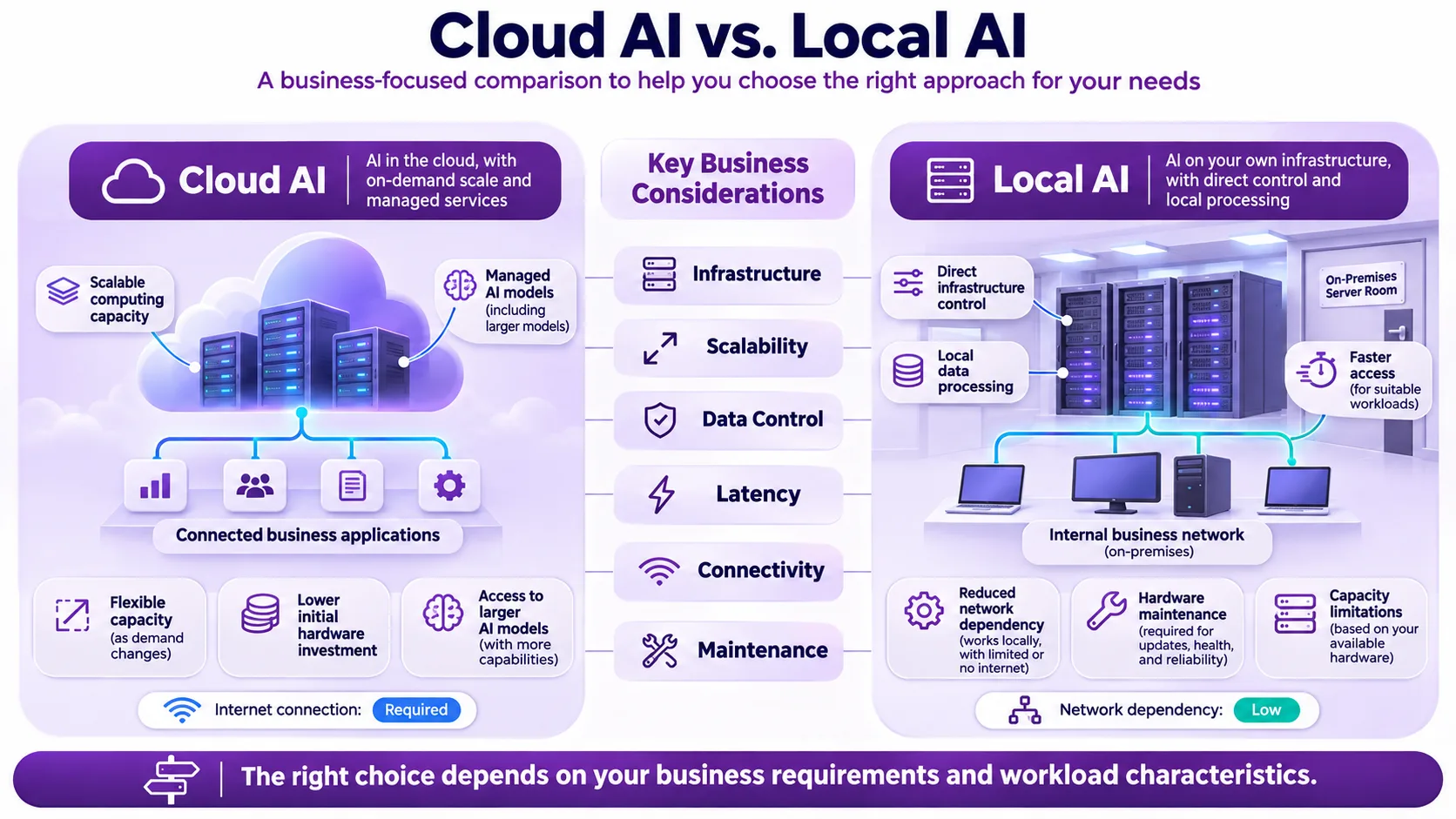
What Are the Key Differences?
Both deployment approaches offer advantages, but their suitability depends on the application.
| Factor | Cloud AI | Local AI |
|---|---|---|
| Infrastructure | Provider hosted computing | On premises servers or devices |
| Initial investment | Usually lower hardware investment | May require hardware purchases |
| Scalability | Flexible, depending on service capacity | Limited by available local resources |
| Data control | Depends on provider configuration | Greater direct infrastructure control |
| Latency | Includes network communication | Can reduce network delays |
| Internet dependency | Usually requires connectivity | Can support offline processing |
| Maintenance | Some responsibilities handled by providers | Greater internal management responsibility |
| Cost structure | Usage based or reserved capacity | Hardware, power, and operating expenses |
Neither deployment approach is automatically faster, cheaper, or more secure.
The decision should reflect actual workload requirements.
When Should Businesses Choose Cloud AI?
Cloud AI is often a good choice for workloads with variable compute requirements or where you want to leverage managed AI services.
1. Variable Demand
Ecommerce businesses may experience increased numbers of AI requests during seasonal campaigns.
By leveraging cloud infrastructure you can scale up your compute resource without having excess hardware on premises.
2. Accessing Sophisticated AI Models
Some applications require larger models and/or more compute which can be expensive to run on premises.
This can be made easier by using cloud services.
3. When Rapid Deployment Matters
Lower initial costs of infrastructure
When using a cloud based hosting solution you can ensure your infrastructure is scalable, reliable, monitored and well managed.
The cloud must be configured correctly with security and cost saving measures in place.
When Is Local AI the Better Option?
Local AI can be a great solution if you need your workloads to be processed locally, for location based workloads.
Sensitivity of data
If you are working with sensitive data you may want some of your workloads to be processed locally.
Ensure you have the right security in place to protect your data.
Less latency
If you have devices in manufacturing or monitoring, or real-time apps, you will want fast response times. Local processing can help reduce latency issues.
Unreliable connections
In some remote situations your internet connection may be unreliable. By using local inference you are guaranteed to run your AI apps.
However, you will have more responsibility for your hardware, models and keeping your infrastructure secure.
How Does Hybrid AI Work in a Real Business Scenario?
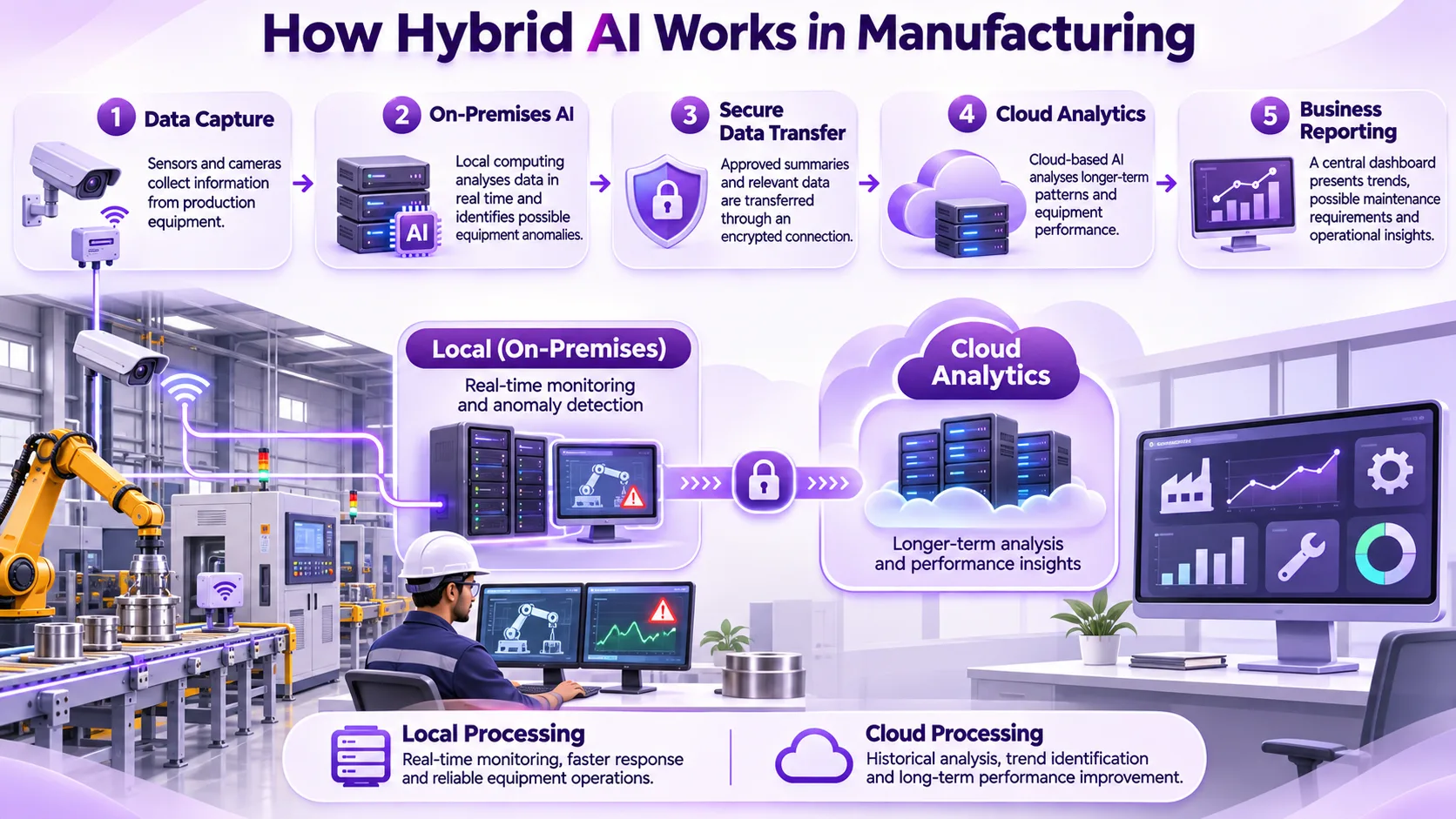
Manufacturing business using AI in their production line
The manufacturing business would like to have real time insights into any potential problems they might have with their equipment. They would also like to see how their equipment is performing overall.
A hybrid solution could be:
- Data capture: Sensors and cameras used to capture data.
- On premise AI: Models run on site to identify any potential anomalies.
- Secure data transfer: Only approved summaries and relevant data transferred to the cloud system.
- Cloud analytics: Models run on the cloud system to identify trends over time.
- Reporting: Reporting provided to the business to aid with maintenance.
This means you can perform your real time tasks whilst still being able to perform your analytics over time.
You will need a reliable connection between your premises and cloud. This includes secure data transfer and reporting.
Good data engineering practices can help organisations manage their data.
How Should Businesses Design a Hybrid AI Architecture?
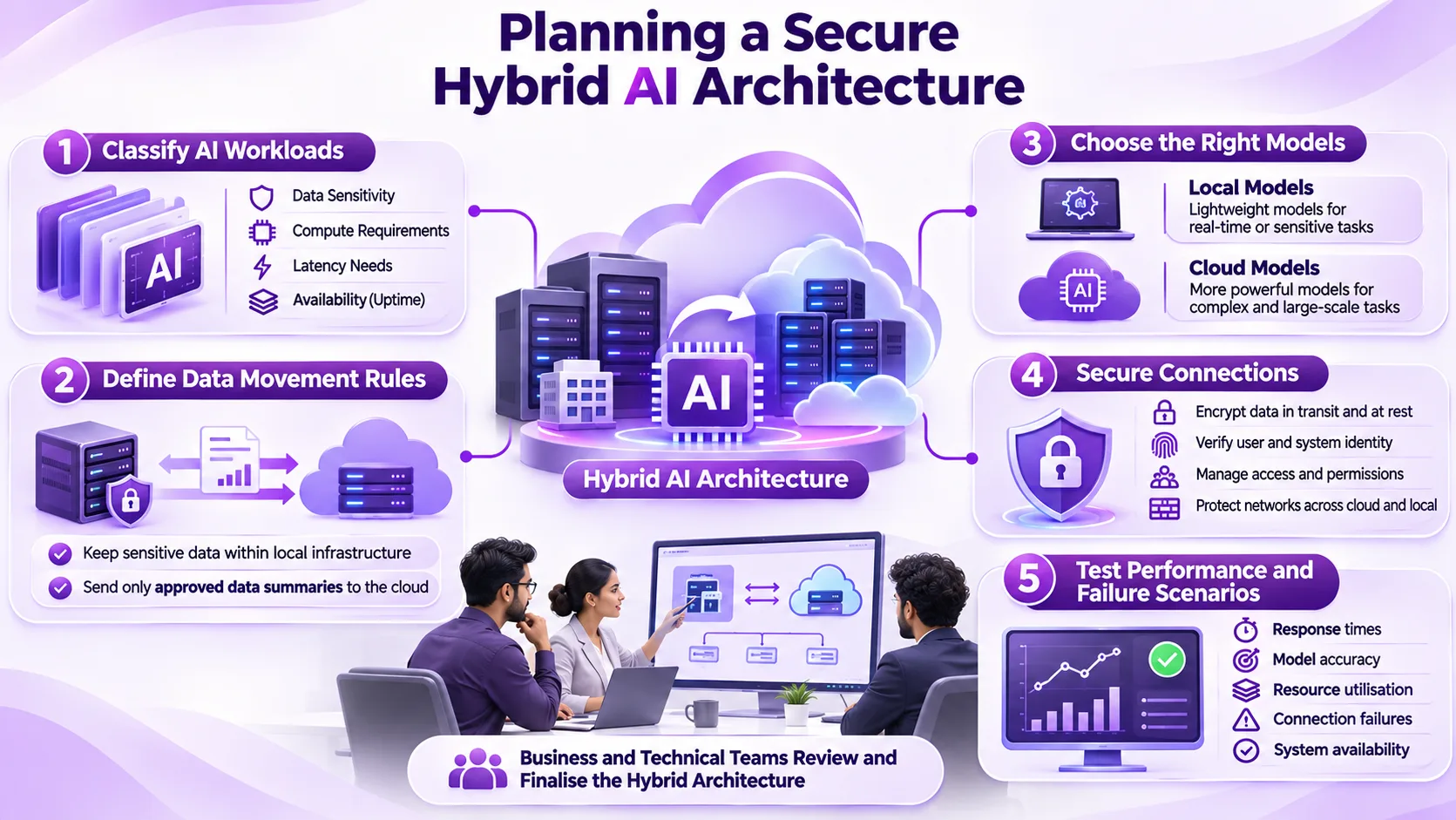
It is often useful to start by considering the individual workloads.
1. Classify your AI Workloads
Decide what applications need to run with low latency, data sensitivity, high compute capability or always on capability.
2. Define data movement rules
Decide what data can be moved out of your systems and what data should stay local.
Consider any data confidentiality requirements, limitations on who has access to it and contractual data requirements.
3. Choose the correct models
Some smaller models may be more suited to running local classifications or monitoring tasks, whilst more intensive workloads may need to run in the cloud. Ensure that you have accurate models.
4. Secure your connection
Set up authentication, encryption, network security and user permissions.
5. Test your performance and failure scenarios
Test your response time, accuracy of your workloads, use of resources and cost.
Test what happens if there is a failure in connecting to the cloud or local systems are not available. A hybrid system will be useful only if all the parts communicate with each other properly.
What Security Risks Should Businesses Consider?
Hybrid AI means more locations to process data. Consider extra security steps.
Make sure the data is secure by knowing where it goes, who has access and the infrastructure.
If this is not done correctly you may lose access to sensitive data.
Ensure there are processes in place for Identity, Encryption, Logging and Incident resolutions.
Regular security checks will help you find any vulnerabilities in your Cloud Services, APIs, Network & Infrastructure.
Ensure security of the owner is clear.
Is Hybrid AI More Cost Effective Than Cloud AI?
It's not always the case.
It may be cost effective to use cloud based AI for variable workloads as it can reduce the requirement to maintain infrastructure.
But it may be cost effective to use local AI for constant processing due to constant utilisation of the hardware.
Hybrid introduces additional costs for the network, synchronisation, monitoring and multiple systems.
Realistically, costs should be compared across:
- Cloud based computing & model usage
- Local hardware & maintenance
- Power, cooling & network costs
- Data transfer & storage
- Security & support
Businesses should look at overall costs of ownership.
How Can MatchBest Software Support Hybrid AI Planning?
MatchBest Software offers cloud infrastructure, data engineering, application development and enterprise technology.
This can be used to support AI workloads within your organisation.
When looking at hybrid deployment options it's important to understand your existing applications, data needs, infrastructure and security.
Ensure you have a good architecture in place to support your operations with minimal complexity.
Final Thoughts
There really isn’t any ‘one size fits all’ answer here.
A cloud solution provides flexibility and managed resources whereas on premise may give you more control over your data and connectivity.
Hybrid options allow you to do both if your business has a genuine requirement to do so. As we head into 2026 it’s important to ensure you’re getting a solution that provides performance, security, cost efficiency and future proofing.
The best solution for you will be one that will meet your operational requirements without over complicating your infrastructure.
For more insights into AI infrastructure, cloud technology, and enterprise innovation, explore technology updates.
Frequently Asked Questions
What is a hybrid AI architecture?
Hybrid AI combines the features of both cloud and local AI to provide an efficient way of managing different workloads.
What is the difference between cloud AI and local AI?
Cloud AI is AI that uses a remote infrastructure. Local AI processes information using your own servers or devices.
Is hybrid AI more secure than cloud AI?
It can be, depending on how secure your data is, how accessible it is, how encrypted it is and your overall system setup.
Can using hybrid AI reduce infrastructure costs?
Yes it can, depending on what workload you are using it for. This will depend on what computing power is needed, how much hardware is being used and what maintenance and integration costs there are.
What type of business would benefit most from hybrid AI?
Businesses that handle sensitive data, require real time processing, have a decentralized setup or fluctuating computing needs.
Would a small business benefit from using hybrid AI?
Yes they would, however it depends on whether the added complexity of the infrastructure is worth it.